My Kiro CLI headless QA agent tests while I sleep
okay, while I'm in standups or sipping coffee

AI QA Governance
A one-day hackathon project that won AWS Marketing Engineering Org Best Technical Achievement - wrapping Kiro CLI's headless mode in an AWS Fargate container so one prompt does the accessibility (a11y) audit for me.
Before we start - a personal note:
This post walks through how you can leverage Kiro CLI's headless mode to its full potential for CI/CD - using a hackathon project as the worked example. Views are my own.
Automated testing catches ~30–50% of WCAG issues. The guidance in this post does not replace screen reader testing, manual color contrast checks, or real assistive technology user testing.
The pitch, in one sentence
“Test the hero component on a live web page for accessibility.”
That’s the entire input in the prototype. A few minutes later, a container in AWS Fargate spins down, a report is written to a results folder, and if there’s a violation a draft ticket is ready for a human to approve.
No IDE. No human clicking around. No QA engineer writing Playwright selectors by hand.
More interestingly to me, during the live demo the prototype flagged a real accessibility issue on a live public page I was testing. This post is my take on how we put it together and the pattern I think is worth exploring further.
Why I started framing this as “governance”
Accessibility testing is hard to do consistently: it’s often manual, it happens late, and the know-how lives in a few senior engineers’ heads.
I reached for “governance” because the interesting goal isn’t just running more tests - it’s making quality checks enforceable: every page, every release, with a paper trail and a sign-off step. That’s the shape of compliance tooling, and it’s what makes this pattern worth exploring at scale. It’s my mental model, not a description of any existing workflow.
AI coding agents are genuinely good at this class of work now. They can reason about a page, drive a browser, cross-reference WCAG, and write up findings. The catch is they usually live inside a local environment, one developer, one prompt at a time. I wanted to see what happens when you get one out of local and into the cloud.
The key unlock: Kiro CLI headless mode
The 2.0 release of Kiro CLI added a true headless mode (docs). Three flags and one env var are all you need:
export KIRO_API_KEY="..."
kiro-cli chat --no-interactive --trust-all-tools --agent my-qa-agent "your prompt here"
--no-interactive— runs to completion with no TTY, prints output to STDOUT, then exits.--trust-all-tools(or the safer--trust-tools=<categories>) — skips approval prompts for tool calls.--agent <name>— loads a custom agent definition (prompt, allowed tools, MCP servers, skills).KIRO_API_KEY— API-key auth; no browser, no OAuth dance.Note: API-key auth is a Kiro Pro, Pro+, or Power feature, and in managed orgs an admin needs to enable key generation — see API key governance.
One more flag worth calling out: --require-mcp-startup makes the CLI exit with code 3 if any MCP server fails to connect. In a container that depends on Playwright MCP, this turns a silent hang into a fast, loud failure. Use it.
That’s the seam. Anywhere you can run a container, you can now run an autonomous coding agent.
The prototype architecture
Here’s what I put together end-to-end for the hackathon.
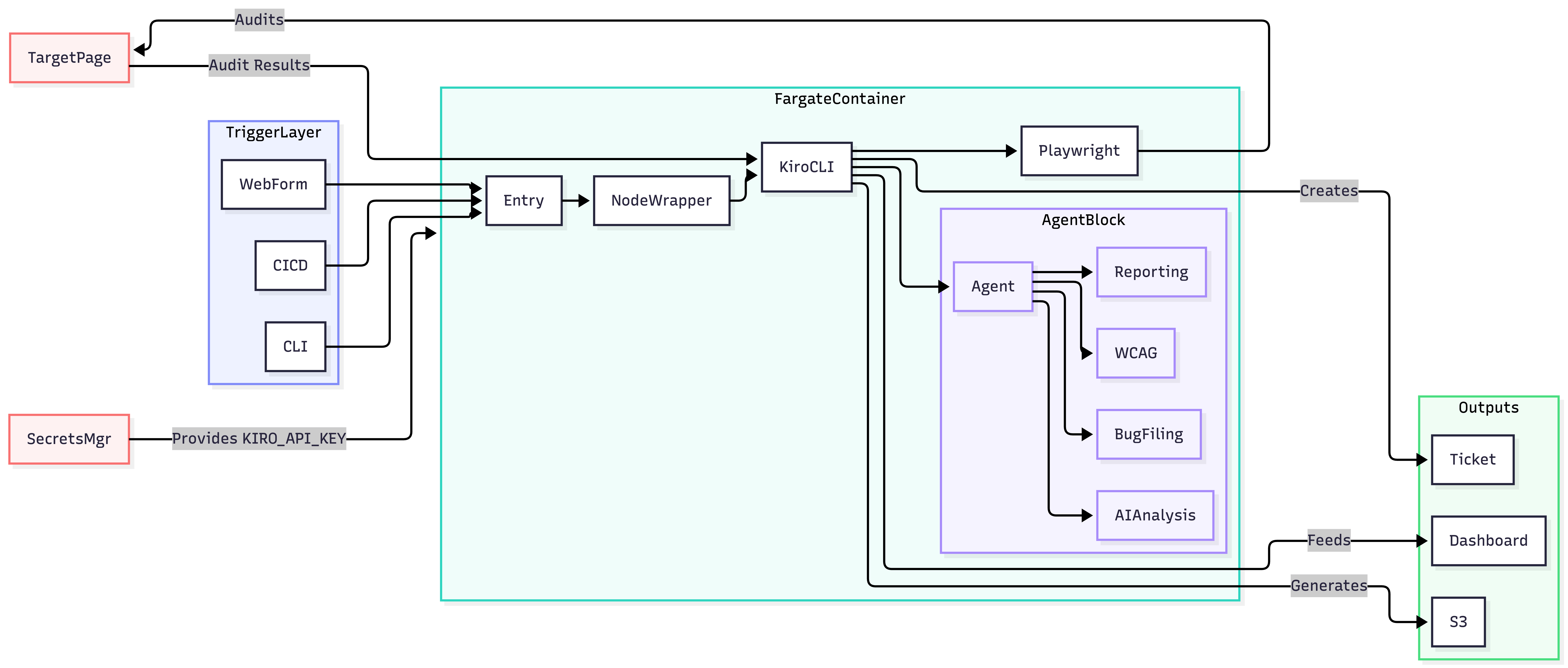
Step by step:
A trigger — in the hackathon, a CLI invocation. CI/CD and a self-serve web form are hypothetical next steps I’m noting for completeness, not things I built.
The container boots, installs Kiro CLI, loads the accessibility agent, pulls
KIRO_API_KEYfrom Secrets Manager, and runs the prompt to completion. Playwright MCP drives a headless Chromium against the target URL.Artifacts (JSON report, screenshots, logs) are written to disk and uploaded to S3. If the agent finds violations and a human approves, a bug-filing skill drafts a ticket.
The Fargate environment I used was a sandbox I had access to for the hackathon — not a shared production CI system.
The agent definition
An agent in Kiro is a JSON file that pins down the personality, the allowed tools, and the knowledge it draws on (agent configuration reference). The one I wrote looks roughly like this (trimmed):
{
  "name": "a11y-qa-agent",
  "description": "WCAG 2.1/2.2 AA accessibility QA using headless Chrome + Playwright MCP",
  "prompt": "file://.kiro/agents/a11y-qa-agent-prompt.md",
  "allowedTools": [
    "read", "write", "grep", "web_fetch",
    "@playwright/browser_navigate",
    "@playwright/browser_snapshot",
    "@playwright/browser_evaluate",
    "@playwright/browser_click",
    "@playwright/browser_press_key",
    "@playwright/browser_resize",
    "@playwright/browser_console_messages"
  ],
  "mcpServers": {
    "playwright": {
      "command": "npx",
      "args": ["-y", "@playwright/mcp@0.0.28", "--headless", "--browser", "chromium"]
    }
  },
  "resources": [
    "skill://.kiro/skills/production-a11y-testing/SKILL.md"
  ]
}
Two things I like about this structure:
The prompt file is where a human-authored accessibility playbook lives. For the hackathon I distilled a small subset; in principle it’s a nice home for what would otherwise be tribal knowledge, version-controlled alongside code.
The skill is a separate reusable procedure. I wrote one for running the audit and another for drafting a bug. Skills let you compose capabilities - an agent gets “a11y audit” by reference, not by copy-paste.
If I were building this out further, I’d imagine a library of agents (regression testing, security review, performance audit, docs linter, localization QA) that anyone could invoke by name.
Running it on AWS Fargate
The run definition I used is deliberately boring:
{
  "ComputeEngine": "Fargate",
  "Runtime": "nodejs20.x",
  "EntryPoint": "scripts/fargate-entry.sh",
  "Timeout": 1800,
  "MemorySize": 4096,
  "CpuUnits": 2048,
  "EnvironmentVariables": {
    "KIRO_SECRET_NAME": "KIRO_API_KEY",
    "KIRO_AGENT": "a11y-qa-agent",
    "KIRO_PROMPT": "run 5 accessibility tests for the hero component on https://example.com/",
    "KIRO_TRUST_TOOLS": "all"
  }
}
The entry script installs the Kiro CLI into the container, pulls the API key from Secrets Manager, and hands control to a small Node.js wrapper that builds the kiro-cli argv from env vars, spawns it, and captures stdout/stderr as artifacts.
Here’s the essence of that wrapper:
const args = [
  "chat",
  "--no-interactive",
  "--trust-all-tools",
  "--require-mcp-startup",  // fail fast if Playwright MCP can't connect
];
if (process.env.KIRO_AGENT) args.push("--agent", process.env.KIRO_AGENT);
args.push(process.env.KIRO_PROMPT ?? DEFAULT_PROMPT);

const child = spawn("kiro-cli", args, { stdio: "pipe" });
child.stdout.on("data", (c) => stdout.push(c));
child.stderr.on("data", (c) => stderr.push(c));
child.on("close", (code) => writeArtifacts(code, stdout, stderr));
For anything beyond a hackathon, I’d swap --trust-all-tools for --trust-tools=read,grep,web_fetch,@playwright/* so the agent only has the permissions it actually needs. The Kiro docs are explicit about least privilege here, and it’s a cheap win.
What the agent actually does on a run
Given a prompt like “test the hero component on this page for accessibility”:
Navigates to the URL via Playwright MCP.
Snapshots the accessibility tree and grabs the console messages.
Locates the target pattern using selectors it reasons about from the DOM snapshot.
Walks a WCAG 2.1 AA checklist from its skill file - keyboard traps, focus order, contrast, alt text, heading hierarchy, ARIA roles, the usual suspects.
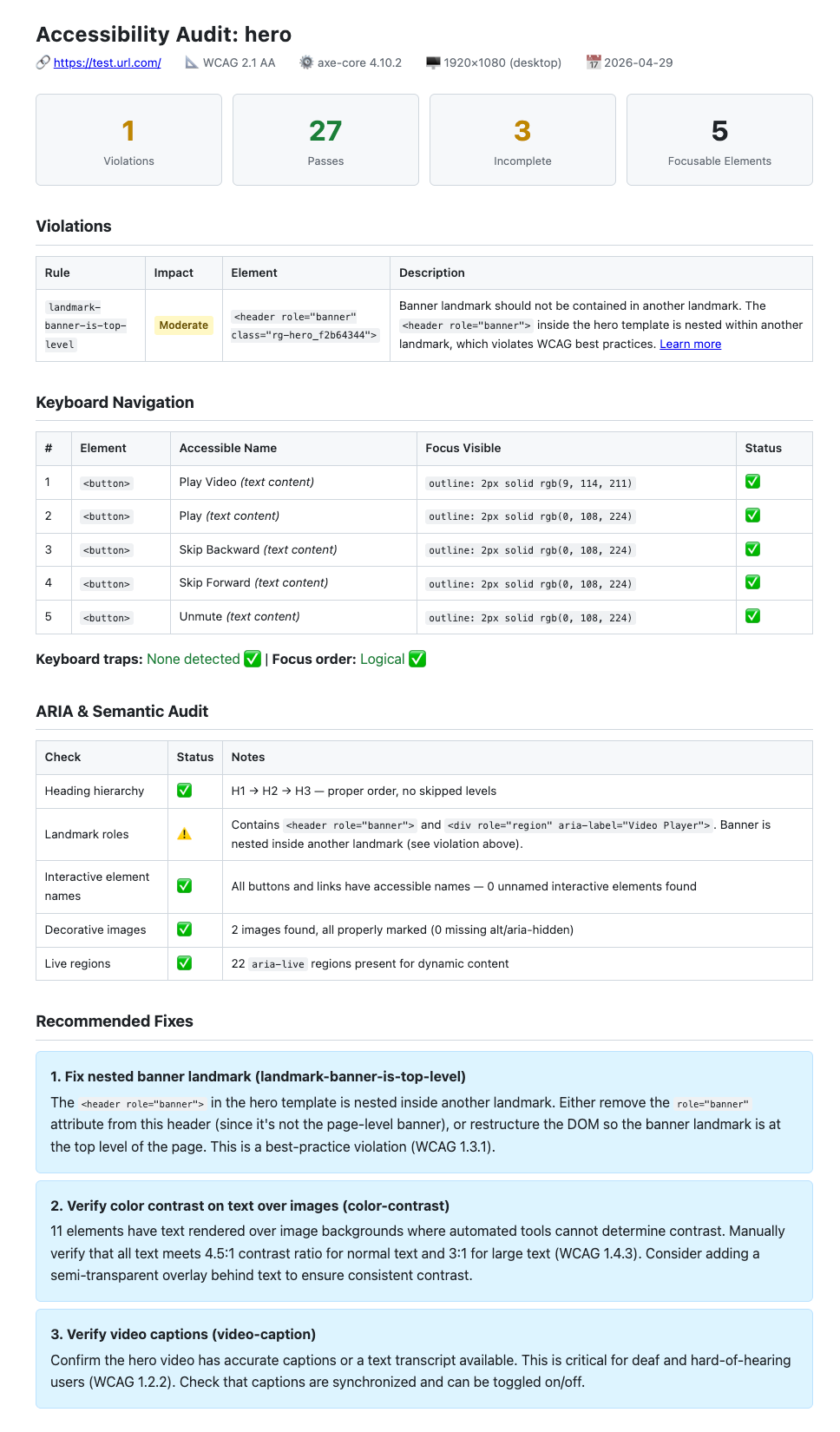
Writes a structured report with violation IDs, affected elements, screenshots, and suggested fixes.
If violations exist and a human approves, calls the bug-filing skill, which formats the finding into a standard template and drafts a ticket.
During the hackathon demo, step 4 flagged a real focus-order issue on a live public page I was testing. The agent drafted a ticket as part of the demo itself. To be clear: this was a one-off demonstration I chose to run, not part of any recurring QA process.
Where I’d personally want to explore next
One-prompt cloud QA is a starting point. A few directions I’d be curious to try:
Shift-left into CI. Same container, different trigger. A pre-merge check that runs the agent on pages affected by a changeset and surfaces new violations. A human reviews the generated findings, not the raw page.
Self-serve for non-engineers. A PM types “check this new page before launch” into a web form, gets a report back, and approves whether anything becomes a ticket.
Composable domains. Accessibility today. Tomorrow maybe: localization QA, SEO checks, copy/style review, visual-regression triage. Each one is another agent definition plus another skill file; the container, the wrapper, and the orchestration stay the same.
The shift I find interesting is treating the AI agent as a first-class citizen of a CI/CD substrate rather than a developer’s personal assistant. Once it runs in a container, it scales like any other workload and “governance” becomes a meaningful word because you’d have a paper trail, a policy file, and an approval step for every check.
What I’d tell another engineer exploring this
If you’re curious about AI coding agents as more than an IDE companion, here’s what I’d share from the weekend:
Look for the headless seam in your agent tool of choice. Without it, you’re stuck in an interactive session. I recommend Kiro CLI 2.0.
Try it on container infra you already know. Fargate, ECS, Kubernetes - whatever’s familiar. Don’t build a platform before you’ve seen one run end-to-end.
Treat agent definitions and skills as version-controlled artifacts. Prompts-as-code made the prototype feel more durable than I expected.
Keep a human in the approval loop, not the execution loop. The agent drafts; a person approves. That trust boundary is what makes the output safe to act on.
Default to least privilege and fail-fast. Prefer
--trust-tools=<list>over--trust-all-tools, and use--require-mcp-startupso broken MCP connections surface immediately.Watch for event-loop and heartbeat gotchas when moving synchronous agent tools into long-running containers.
The whole project was roughly 500 lines of glue code, written in a day. The agent definition and the skill files are the part that mattered most, and they’re shorter than this post.
Further reading
Kiro CLI headless mode — the official docs
Run Kiro CLI programmatically: introducing headless mode — the launch blog
Kiro CLI 2.0 changelog — what else shipped in 2.0
Credits
Built in a day at an internal hackathon with two teammates - Theo Kluge and Kaitlin McMichael and far too much coffee. Won Best Technical Achievement. More importantly to me, it was a fun way to test an idea I’d been turning over and a reminder that the fastest way to learn what an AI agent can do outside an IDE is to put one in a box and push start.